

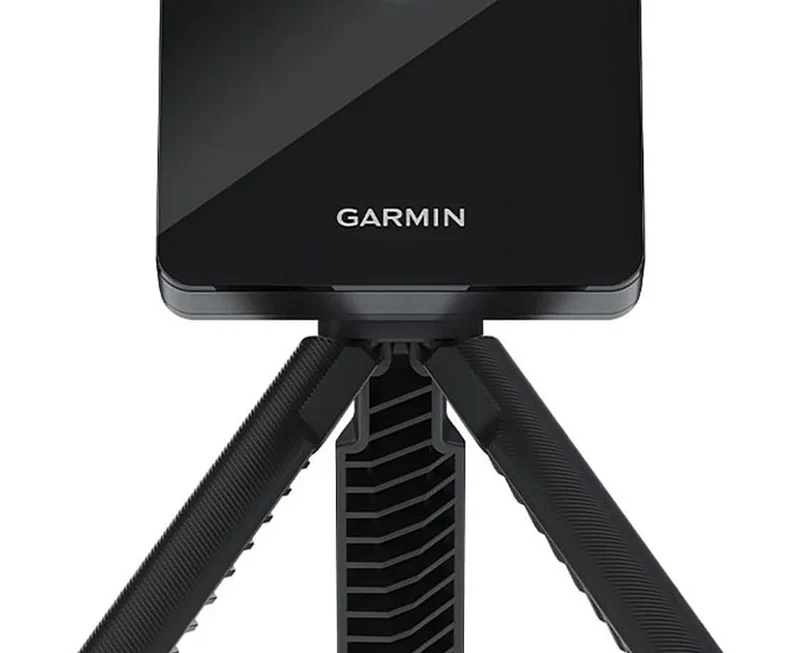
Golf practice used to be simple: hit a bucket, guess what changed, and hope the good shots followed you to Saturday morning. That guessing is exactly why Garmin Approach R10 has caught so much attention among U.S. golfers who want useful feedback without paying the price of a fitting studio. The appeal is not mystery. This small monitor tracks more than a dozen swing and ball metrics, works with the Garmin Golf app, and supports virtual rounds through paid app features, according to Garmin’s own product listing. Recent retail data also shows strong buyer interest, with Amazon showing 1K+ bought in the past month and a sale price far below the original list price at the time checked. For weekend players, that turns a serious training tool into something closer to a range-bag habit. The better question is not whether golfers are talking about it. They are. The question is whether the buzz matches the way most amateurs practice.
Why Garmin Approach R10 Became the Range Gadget Golfers Actually Carry
The first reason the R10 stands out is plain: golfers carry it. Plenty of training tools sound smart in a product photo and then stay in the closet. A launch monitor only matters if it follows you to the garage net, the public range, the backyard mat, and the pre-round warmup bay.
The appeal starts with size, not specs
Most amateurs do not need a tour-truck setup. They need something they can charge, pair with a phone, place behind the ball, and trust enough to notice patterns. That is where the R10 found its lane. It gives players data without making the session feel like a science lab.
A golfer in Ohio hitting 60 balls after work is not trying to write a fitting report. He wants to know why his 7-iron carried 142 yards last week and 153 today. He wants a number that starts a better question. Was contact better? Was launch higher? Did club speed change?
That sounds small, but it changes the range session. Instead of judging every shot by feel, you begin to see how feel lies. A shot can feel flushed and still launch too low. A swing can feel slower and produce better smash factor. The monitor becomes less of a scoreboard and more of a mirror.
Budget golfers care about habits before lab accuracy
The counterintuitive part is that perfect accuracy is not the main reason casual players improve. Consistent feedback matters more. A $10,000 system can be wasted by a golfer who hits balls with no plan. A cheaper portable monitor can help a disciplined player build better habits.
That does not mean accuracy is irrelevant. It means the job must match the tool. MyGolfSpy notes the R10 offers 14 metrics and strong feature depth, while also warning that spin can be a weak spot and outdoor use tends to be better. That is a fair trade for many amateurs.
For driving range practice, the best use is trend tracking. You are not asking the unit to settle a tour fitting dispute. You are asking it whether your driver carry is trending up, whether your wedge gap is stable, and whether one club keeps producing the same miss.
That is where the hype makes sense. Golfers are not buying a pocket-sized truth machine. They are buying a reason to practice with intent.
Data That Helps More When You Stop Chasing Every Number
The trap with any golf launch monitor is number overload. Once the screen starts showing club speed, ball speed, launch angle, spin, carry, direction, and smash factor, the session can lose its shape. More data does not always mean better practice.
Good players know what to ignore.
Which swing data deserves your attention first
Start with carry distance, launch direction, and ball speed. Those three numbers tell an honest story for most players. Carry shows useful yardage. Launch direction shows starting line. Ball speed gives a rough window into strike quality.
Swing data should support the shot, not distract from it. If your 8-iron carry jumps between 128 and 151 yards, the lesson is not hidden in a rare metric. Your strike pattern is loose. If every driver starts right, your face or path is sending a message. The fix begins there.
This is why a portable golf simulator can be more than winter entertainment. It lets you turn the boring parts of practice into a record. You can hit ten wedges, save the session, and compare it next week. That is better than leaving the range with one good swing in your memory and nine weak ones politely forgotten.
For readers tracking golf gear trends through consumer product coverage, this is the part that explains the current buzz. The R10 sits at the point where tech feels useful without becoming a second hobby.
Why bad shots can teach more than perfect ones
A clean shot makes you feel good. A bad shot teaches faster.
Say you hit five 6-irons. Two are solid, one is thin, one leaks right, and one turns over too much. Without data, you may remember the solid ones and call the session fine. With swing data, the weak shots stay visible. Your pattern has nowhere to hide.
That can sting. It also helps. Golfers often chase the swing that produced their best ball instead of fixing the swing that produced their common miss. A launch monitor pushes you toward the average, and the average is where your score lives.
There is a quiet lesson here for mid-handicap players. Your best shot is probably good enough already. Your score drops when your poor shot becomes less costly. The monitor helps because it makes those poor shots measurable rather than emotional.
That is also why the R10 should not replace lessons. It should make lessons sharper. A coach can look at a saved session, see the spread, and talk about the pattern instead of guessing from three warmup swings.
Indoor Practice, Garage Nets, and the Space Problem
Many U.S. golfers are not trying to build a luxury simulator room. They are trying to hit balls in a garage after the kids go to bed or in a basement when the course is frozen. That is where the R10 gets exciting, but also where expectations need to stay grounded.
Indoor golf rewards careful setup.
How to make a portable golf simulator feel honest
The best indoor setup starts with boring details. You need enough room behind the ball, enough ball flight into the net, a level hitting mat, clean alignment, and lighting that lets your phone and app setup behave. Skip those basics and the numbers may feel strange.
A common mistake is treating a small monitor as magic. It still needs space to read the shot. Doppler radar units often perform best when they can watch enough of the ball’s early flight. Indoors, that means your setup matters as much as the unit itself.
A simple garage setup might include a hitting mat, a net, an alignment stick, and a phone mount. Add the R10, then build sessions around one club at a time. Ten drivers followed by ten wedges followed by random full swings turns into noise. Better practice has a theme.
Use it for wedge gapping first. Hit partial shots with a sand wedge, gap wedge, and pitching wedge. Record carry numbers. Most amateurs lose strokes inside 120 yards because their “feel” yardages are blurry. A screen can make those distances less vague.
Why setup mistakes create fake confidence
The strange part about indoor practice is that it can make you too confident. A net hides ball flight. A simulator screen can make a weak pattern look tidy if alignment is wrong or the hitting area is cramped. The room can flatter you.
That is why you should test indoor numbers against outdoor driving range practice. If your garage 7-iron keeps showing 160 yards but the range says 148 carry, do not argue with reality. Adjust your setup, check ball position, and compare again.
Reviews have pointed out that the R10 performs better outside and can struggle more with spin than higher-priced systems. That matters most for golfers who want exact driver spin or fine club-fitting detail. It matters less for a player trying to learn stock yardages and cleaner contact.
For home users, the smartest path is modest. Use indoor sessions for repetition, start line, and carry windows. Use outdoor sessions for confirmation. That mix keeps the tool honest.
This is also where an internal resource like home golf simulator setup would fit well, because the monitor is only one piece of the practice space.
Buying Sense for American Golfers Watching the Buzz
The R10 is popular because it sits in a sweet spot. It is not cheap in the casual sense, but it is far below premium camera and radar systems. That makes it tempting for golfers who want data but cannot justify a country-club-level tech budget.
The best buyer is honest about use.
Who should buy the R10 before spending more
Buy it if you practice at least twice a month and want a record of your sessions. Buy it if you care about carry distances. Buy it if winter ruins your swing every year and you want a garage routine that keeps your body moving.
It also makes sense for golfers who already like Garmin’s sports products. Breaking Eighty’s long-term review argues the R10 still has a place because of its ease, portability, saved shot data, and wider Garmin app connection, even as newer competitors have entered the under-$1,000 space.
The R10 also fits families. A parent and teenager can use the same unit for practice. Four buddies can turn a dull winter night into virtual golf. The fun side matters because golfers use tools that make practice feel less lonely.
One non-obvious buying point: entertainment can protect improvement. If virtual rounds make you practice more, that matters. A “serious” tool you never open is less useful than a playful one that gets 40 swings out of you on a Tuesday night.
Who should skip it or wait for another monitor
Skip it if you want exact spin numbers for driver fitting. Skip it if your indoor space is tight and you cannot give the unit proper room behind the ball. Skip it if you hate app-based devices and want a built-in display.
Also pause if you only play a few times a year. A launch monitor will not fix a swing by sitting in a drawer. Spend that money on lessons, range time, or a proper wedge fitting first.
The R10 is best as a practice partner, not a miracle shortcut. That distinction matters. If you want to build better sessions, it can help. If you want proof that every swing thought is working, it may frustrate you.
Tournament-minded players should also separate practice technology from on-course rules. The USGA’s guidance says distance-measuring devices are allowed by default under Rule 4.3, though committees may prohibit them by Local Rule. Launch-monitor work belongs mainly in practice, and players should always check event rules before bringing electronics into competition settings.
For readers comparing gadgets, best golf training gadgets would be a natural next step because the right tool depends on space, goals, budget, and patience.
Conclusion
Golfers are drawn to small promises that feel practical. Hit a ball. See a number. Learn something before the next swing. That is the real reason the R10 keeps pulling attention years after launch, even with newer rivals fighting for the same buyer. It gives regular players a way to turn loose practice into a measured routine.
The Garmin Approach R10 deserves the buzz when it is used with clear expectations. It is not the final word in fitting accuracy, and it should not be treated like a premium studio system. But for American golfers who want better range sessions, garage practice, saved swing data, and a portable golf simulator experience, it lands in a useful middle ground.
The smart move is simple. Buy it for patterns, not perfection. Use it to learn your carry numbers, tighten your misses, and make practice less random. If that sounds like the kind of golf work you will do often, the hype may have a point.
Frequently Asked Questions
How much does the Garmin R10 usually cost?
Prices change often, but the R10 has commonly carried a list price around $599.99, with sale pricing sometimes dropping lower through major retailers. Check current U.S. pricing before buying, because golf tech discounts can shift during holiday, spring, and Prime-style sales.
Is the R10 good for beginners?
Yes, if the beginner wants simple feedback and plans to practice. New golfers should focus on carry distance, start direction, and contact quality first. Too many numbers can confuse early progress, so beginners should keep sessions short and goal-based.
Can you use the R10 indoors?
Yes, but indoor results depend heavily on setup. You need enough depth, clean alignment, a stable mat, and a safe net or screen. Small rooms can create weak readings, so compare indoor sessions with outdoor range results when possible.
Does the R10 replace golf lessons?
No. It gives data, but it does not diagnose your swing like a good coach. The best use is pairing saved shot sessions with instruction. A teacher can use the numbers to spot patterns faster and give better practice goals.
What metrics should average golfers watch first?
Carry distance, launch direction, ball speed, and dispersion are the best starting points. Those numbers connect directly to scoring. Spin and attack details can help later, but they should not distract from strike, distance control, and shot shape.
Is the R10 accurate enough for club fitting?
It can help with broad comparisons, but it is not the best choice for serious fitting. Players making expensive shaft, driver, or ball changes should use a higher-end fitting setup with stronger spin and club delivery measurement.
Do you need a subscription for the best features?
Some simulator and premium app features require a paid Garmin Golf membership. Basic practice value still comes from shot data and session tracking, but buyers who want virtual courses should review current subscription terms before purchasing.
Who should avoid buying this monitor?
Golfers with cramped indoor space, players needing exact spin data, and people who dislike phone-based devices may prefer another option. Casual players who rarely practice may also get more value from lessons, range buckets, or short-game work.